 Analog Click
Importing one replaces your layout and adds its actions to My Set. If My Set already has an action for the same moves, the one in the file replaces it. If the file has no landscape layout, your landscape layout stays as it is. A file missing its layout or actions changes nothing.
Importing and exporting need the Full Version.
Samples
Each sample's screens and full contents are at the bottom of this page.
How to use a sample
- Download a file and save it to the Files app.
- In Analog Click, open Settings and choose Import Settings File.
- Check the contents and tap Import.
Export your own
In Settings, choose Export Settings File. Your layouts for both orientations and My Set are saved to one file. You can edit the exported file and import it again.
Make your own settings file
A settings file is a UTF-8 text file with the extension .json. You can write one in any text editor, or give this page to an AI assistant and describe the panel you want. Everything the app reads is described below.
The whole file
{
  "version": 1,
  "name": "My Panel",
  "layout": ["knock:0:0", "slider:1:3", "reel:1:5"],
  "layoutLandscape": ["knock:0:0", "reel:0:2", "slider:6:2"],
  "bindings": [
    { "actions": ["knockIn"], "builtIn": "toggleLight" },
    { "actions": ["sliderRight", "reelSpin"], "builtIn": "timer25" },
    { "actions": ["knockOut"], "builtIn": "showText", "text": "Back in 5 minutes" }
  ],
  "analog": [
    { "control": "reel", "target": "volume" }
  ]
}
version(required): Always1.name(required): The file's name, 1 to 100 characters. It is shown when you import the file.layout(required): The portrait layout. A list of controls and where they go. At least one.layoutLandscape(optional): The landscape layout, written the same way. Leave it out to keep your current landscape layout. If you include it, it can't be empty.bindings(required): The actions. Each one runs a built-in action when you move controls in a set order. 1 to 100 of them.analog(optional): Controls that set a level directly while you move them, like a volume wheel.
Names are case-sensitive. Keys the app doesn't know are ignored. The file can be up to 1 MB.
Layouts
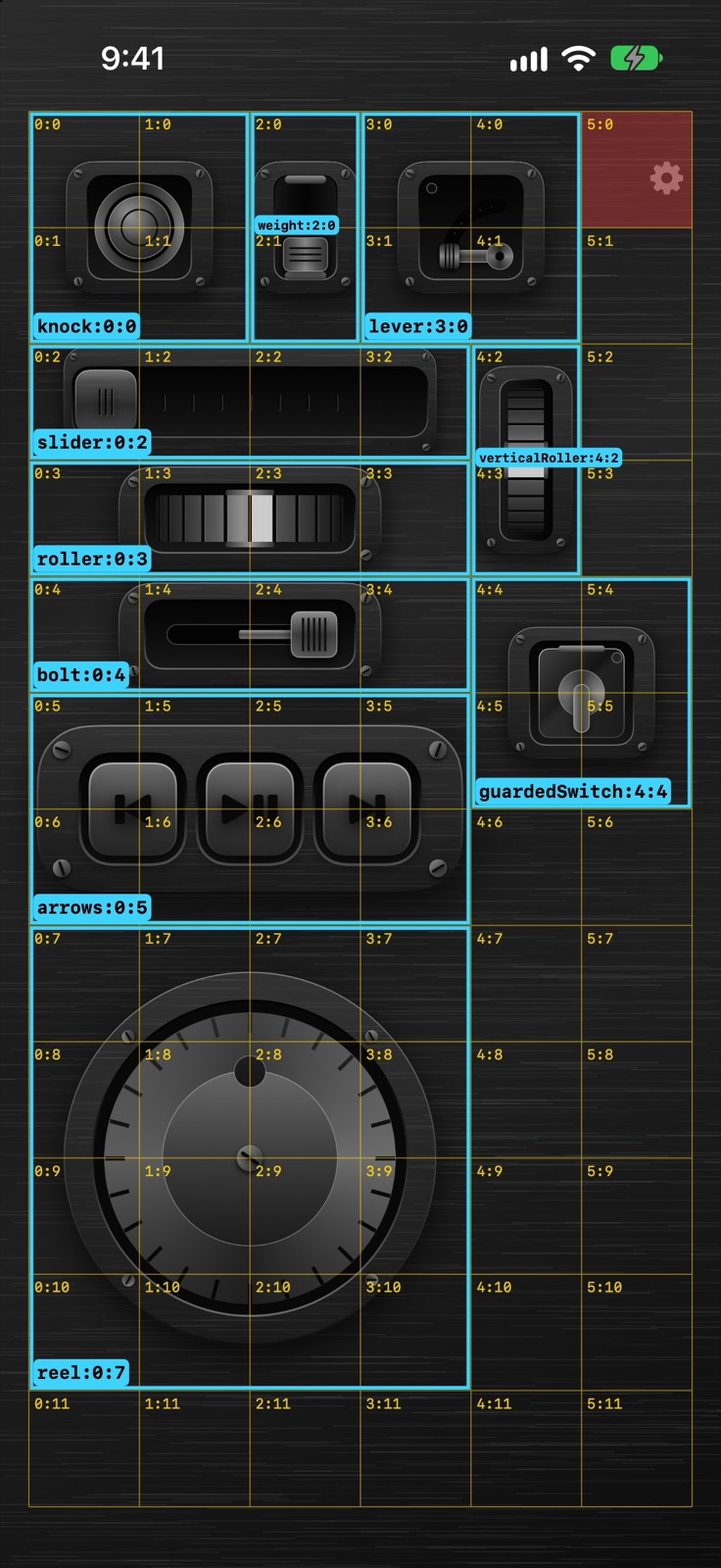
Each entry is "control:column:row". The column and row are the cell of the control's top-left corner. Counting starts at 0 from the top left.
- Portrait: 6 columns by 12 rows. Columns 0 to 5, rows 0 to 11.
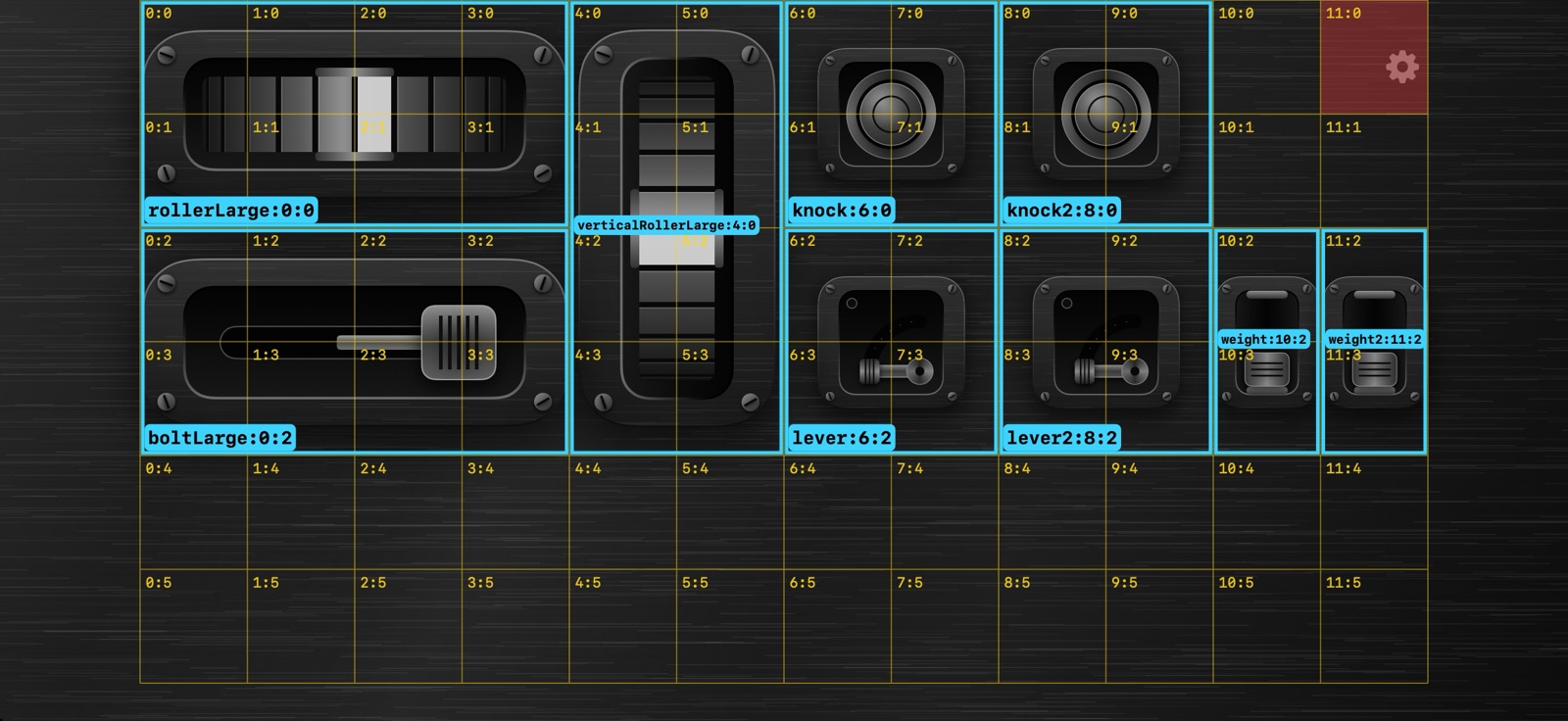
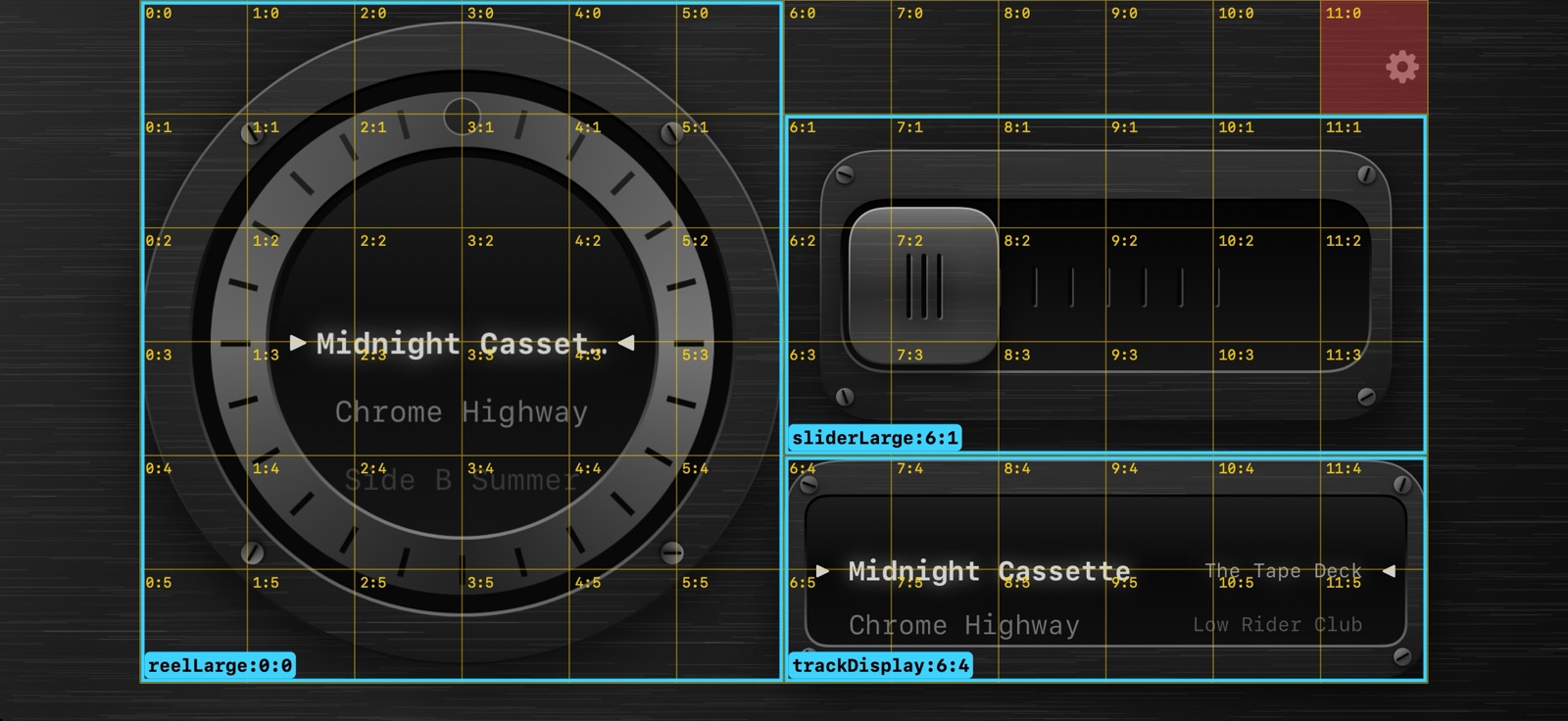
- Landscape: 12 columns by 6 rows. Columns 0 to 11, rows 0 to 5.
- The top-right cell holds the settings button and can't be used: 5:0 in portrait, 11:0 in landscape.
- A control must fit inside the grid and can't overlap another control.
- Most controls can be placed twice. Add
2to the name for the second one, likeknock2. Place the first one too. - Some controls have a large size, like
sliderLarge. A control and its large size can't both be on the screen, and the large size has no second copy. - The Track Display (
trackDisplay) can be placed once.
If any entry breaks these rules, the file isn't imported.
Every standard control, portrait. Each cell shows its column:row. The red cell is the settings button.
Large sizes and second copies, landscape.
Controls
Size is columns × rows. The moves are what you write in actions. The analog name is what you write in analog.
knockClick Button / ノック式ボタン, 2×2. Moves:knockIn,knockOut.weightWeight / おもり, 1×2. Moves:weightUp,weightDown. Shake the iPhone to move it. Shaking does nothing unless a weight is on the screen.leverFlip Lever / 跳ね上げレバー, 2×2. Moves:leverUp,leverDown.sliderSlider / スライダー, 4×1.sliderLarge, 6×3. Moves:sliderLeft,sliderRight. Analog:slider.rollerHorizontal Roller / 横ローラー, 4×1.rollerLarge, 4×2. Move:rollerSpin. Analog:roller, androller2for the second copy.reelReel / リール, 4×4.reelLarge, 6×6, can show your songs in its center. Moves:reelSpin,reelClockwise,reelCounterclockwise. Analog:reel.verticalRollerVertical Roller / 縦ローラー, 1×2.verticalRollerLarge, 2×4. Move:verticalRollerSpin. Analog:verticalRoller, andverticalRoller2for the second copy.guardedSwitchGuarded Switch / カバー付きスイッチ, 2×2. Moves:switchOn,switchOff.boltCocking Bolt / コッキングボルト, 4×1.boltLarge, 4×2. Move:boltCycle.arrowsArrow Buttons / 矢印ボタン, 4×2. Moves:arrowLeft,arrowCenter,arrowRight,arrowLeftHold,arrowRightHold. Holding an arrow for half a second sends its hold instead of its press.ignitionIgnition Key / イグニッションキー, 3×3. Moves:ignitionOn,ignitionStart,ignitionOff.rotaryDialRotary Dial / 回転盤, 4×4. Moves:dialOne,dialTwo,dialThree,dialFour,dialFive,dialSix,dialSeven,dialEight,dialNine,dialZero, one for each number dialed.throttleThrottle Grip / アクセルグリップ, 4×2. Moves:throttleTwist,throttleFull. Swipe down to twist it; it plays its own engine sound with any sound pattern except Silent.trackDisplayTrack Display / 曲名表示, 6×2. No moves. Shows your songs while a control is set totrackList.barometerBarometer / 晴雨計, 1×1.barometerLarge, 2×2. No moves. Shows the coming weather as a single mark from your iPhone's pressure sensor; tap it to turn to tonight's moon. The readings never leave the phone. One copy only.
Second copies: knock2, weight2, lever2, slider2, roller2, reel2, verticalRoller2, guardedSwitch2, bolt2, arrows2, ignition2, rotaryDial2, throttle2. A large size counts as the first copy, so reelLarge sends the same moves as reel.
Actions (bindings)
{ "actions": ["sliderRight", "reelSpin"], "builtIn": "timer25" }
actions(required): The moves, in order, 1 to 3 of them. Do them all within 4 seconds and the built-in action runs.builtIn(required): What runs. See the list below.text: Only for the five built-in actions that need words or an address, and required for them. 1 to 500 characters. Don't write it for any other action.
How moves are matched:
- A move without 2 runs from either copy of a control.
knockInworks onknockandknock2. - A move ending in 2 runs only from the second copy, like
knockIn2. Every move has a 2 form. reelSpinmatches a spin in either direction.reelClockwiseandreelCounterclockwisematch only one direction.- When two actions could run, the one with more moves wins.
- Each order of moves runs one action. If two bindings have the same moves, the last one is used.
- An action only runs if its controls are on the screen.
Moves:
knockInPress the button in / ボタンを押し込むknockOutRelease the button / ボタンを戻すweightUpShake weight up / 振っておもりを上へweightDownShake weight down / 振っておもりを下へleverUpFlip lever up / レバーを上げるleverDownFlip lever down / レバーを下げるsliderLeftSlide left / スライダーを左へsliderRightSlide right / スライダーを右へrollerSpinSpin the roller / ローラーを回すreelSpinSpin the reel / リールを回すreelClockwiseSpin reel clockwise / リールを時計回りに回すreelCounterclockwiseSpin reel counterclockwise / リールを反時計回りに回すverticalRollerSpinSpin the vertical roller / 縦ローラーを回すswitchOnFlip switch on / スイッチをオンにするswitchOffFlip switch off / スイッチをオフにするboltCyclePull and release the bolt / ボルトを引いて放すarrowLeftPress left arrow / 左の矢印を押すarrowCenterPress center button / 中央のボタンを押すarrowRightPress right arrow / 右の矢印を押すarrowLeftHoldHold left arrow / 左の矢印を長押しarrowRightHoldHold right arrow / 右の矢印を長押しignitionOnTurn key to ON / キーをONにするignitionStartTwist key to START / キーをひねってエンジンをかけるignitionOffTurn key to OFF / キーをOFFにするdialOneDial 1 / 回転盤で1を回すdialTwoDial 2 / 回転盤で2を回すdialThreeDial 3 / 回転盤で3を回すdialFourDial 4 / 回転盤で4を回すdialFiveDial 5 / 回転盤で5を回すdialSixDial 6 / 回転盤で6を回すdialSevenDial 7 / 回転盤で7を回すdialEightDial 8 / 回転盤で8を回すdialNineDial 9 / 回転盤で9を回すdialZeroDial 0 / 回転盤で0を回すthrottleTwistTwist the throttle / アクセルをひねるthrottleFullOpen the throttle wide / アクセルを全開にする
Built-in actions
Music
playMusicPlay music / 音楽を再生pauseMusicPause music / 音楽を一時停止togglePlaybackToggle play/pause / 再生と一時停止を切り替えnextTrackNext track / 次の曲previousTrackPrevious track / 前の曲restartTrackRestart track / 曲の先頭に戻るseekForwardForward 15 seconds / 15秒早送りseekBackwardBack 15 seconds / 15秒巻き戻しtoggleShuffleToggle shuffle / シャッフルを切り替えtoggleRepeatToggle repeat / リピートを切り替え
Volume
volumeUpVolume up / 音量を上げるvolumeDownVolume down / 音量を下げるmuteToggle mute / 消音を切り替え
Screen
brightnessUpBrighter / 明るくするbrightnessDownDimmer / 暗くするbrightnessMaxMaximum brightness / 明るさを最大にするbrightnessMinMinimum brightness / 明るさを最小にするtoggleKeepAwakeToggle keep screen on / 画面を消さないモードを切り替えtoggleWhiteScreenLight the screen white / 画面全体を白く光らせるtoggleDarkScreenBlack out the screen / 画面全体を暗くする
Flashlight
toggleLightToggle flashlight / ライトを切り替えlightOnFlashlight on / ライトをつけるlightOffFlashlight off / ライトを消すcycleLightLevelChange flashlight brightness / ライトの明るさを切り替えblinkLightBlink flashlight / ライトを点滅sosLightFlash SOS / ライトをSOS点滅
Vibration
vibrateShortShort vibration / 短く振動vibrateLongLong vibration / 長く振動vibrateRhythmVibrate in rhythm / リズムで振動
Sounds
playChimePlay a chime / チャイムを鳴らすtoggleMetronomeToggle metronome / メトロノームを切り替えtoggleWhiteNoiseToggle white noise / ホワイトノイズを切り替えtoggleRainToggle rain sounds / 雨音を切り替え
Speech
speakTimeSpeak time / 時刻を読み上げspeakDateSpeak date / 日付を読み上げspeakBatterySpeak battery level / バッテリー残量を読み上げspeakStorageSpeak free storage / 空き容量を読み上げspeakTextSpeak saved text / 登録した文章を読み上げ. Needstext: the words to speak.
Display
showTimeShow time / 時刻を表示showDateShow date / 日付を表示showBatteryShow battery level / バッテリー残量を表示showStorageShow free storage / 空き容量を表示showTextShow saved message / 登録したメッセージを表示. Needstext: the message.
Timers
timer11-minute timer / 1分タイマーtimer33-minute timer / 3分タイマーtimer55-minute timer / 5分タイマーtimer1010-minute timer / 10分タイマーtimer2525-minute timer / 25分タイマーcancelTimerCancel timer / タイマーを取り消すtoggleStopwatchStart/stop stopwatch / ストップウォッチを開始/停止resetStopwatchReset stopwatch / ストップウォッチをリセット
Counter and log
counterUpCount up / カウンターを増やすcounterDownCount down / カウンターを減らすcounterResetReset counter / カウンターをリセットlogTimeLog current date and time / 今の日時を記録copyLogCopy logged times / 記録した日時をコピー
Random
coinFlipFlip a coin / コイントスrollDiceRoll a die / サイコロを振るrandomNumberRandom number 1–100 / 1〜100の数字を抽選pickFromListPick from a saved list / 登録した項目から抽選. Needstext: the items, separated by commas (, or 、) or new lines.
Copy
copyTextCopy saved text / 登録した文章をコピー. Needstext: the text to copy.copyDateTimeCopy current date and time / 今の日時をコピー
App
cycleColorSwitch color / カラーを切り替えcycleSoundSwitch sound pattern / 音のパターンを切り替えcycleLayoutSwitch layout / 画面の配置を切り替えcycleSetSwitch action set / 動作のセットを切り替えresetControlsReset the slider and other controls / スライダーなどの位置をリセットlockControlsLock controls / 操作をロックunlockControlsUnlock controls / ロックを解除
Open
openURLOpen URL / URLを開く. Needstext: an address such as https://, maps:, mailto:, sms:, or tel:.openAppSettingsOpen this app's settings / このアプリの設定画面を開く
The lock only holds while a Click Button is on the screen and one of your actions runs unlockControls, so you can always unlock. While locked, only unlockControls runs.
Analog controls
{ "control": "roller", "target": "volume" }
control:slider,roller,roller2,verticalRoller,verticalRoller2,reel, orreel2.target:volume(Volume / 音量),brightness(Screen brightness / 画面の明るさ),lightLevel(Flashlight brightness / ライトの明るさ),trackPosition(Place in song / 曲の位置), ortrackList(Song selection / 曲の選択).
- Each control sets one level. If a control is listed twice, the last one is used.
roller,verticalRoller, andreelare the first copy or the large size, androller2,verticalRoller2, andreel2are the second copy.slidermeans both copies and the large size. A vertical roller raises a level when you move it up.trackListshows your songs on the Track Display or in the center of the large reel. Turn the control to choose a song.- A control can send moves for
bindingsand set a level at the same time.
When a file won't import
- "The file is too large.": Keep it under 1 MB.
- "Couldn't read this file format.": Check for missing commas or brackets, a missing
versionorname, and misspelled moves or built-in actions. - "This file version isn't supported.": Set
versionto 1. - "A settings file needs both a layout and actions. Nothing was changed.": Add
layoutand at least one binding. An emptylayoutLandscapealso causes this. - A message about the layout: A control is unknown, outside the grid, overlapping another, on the settings button, listed twice, or placed in both sizes.
- A message about the number of moves or the text: Use 1 to 3 moves, and write
textonly where it's needed.
Asking an AI to make one
Give an AI assistant this page and say what you want, for example: "Make an Analog Click settings file. Portrait and landscape. A lever that starts a 10-minute timer, a Click Button that locks and unlocks, and a roller for volume." Then check that every control fits the grid in both directions before you import it.
Sample contents
Each picture shows the sample on screen with the grid drawn over it. The labels match the layout entries in the file.
Boombox
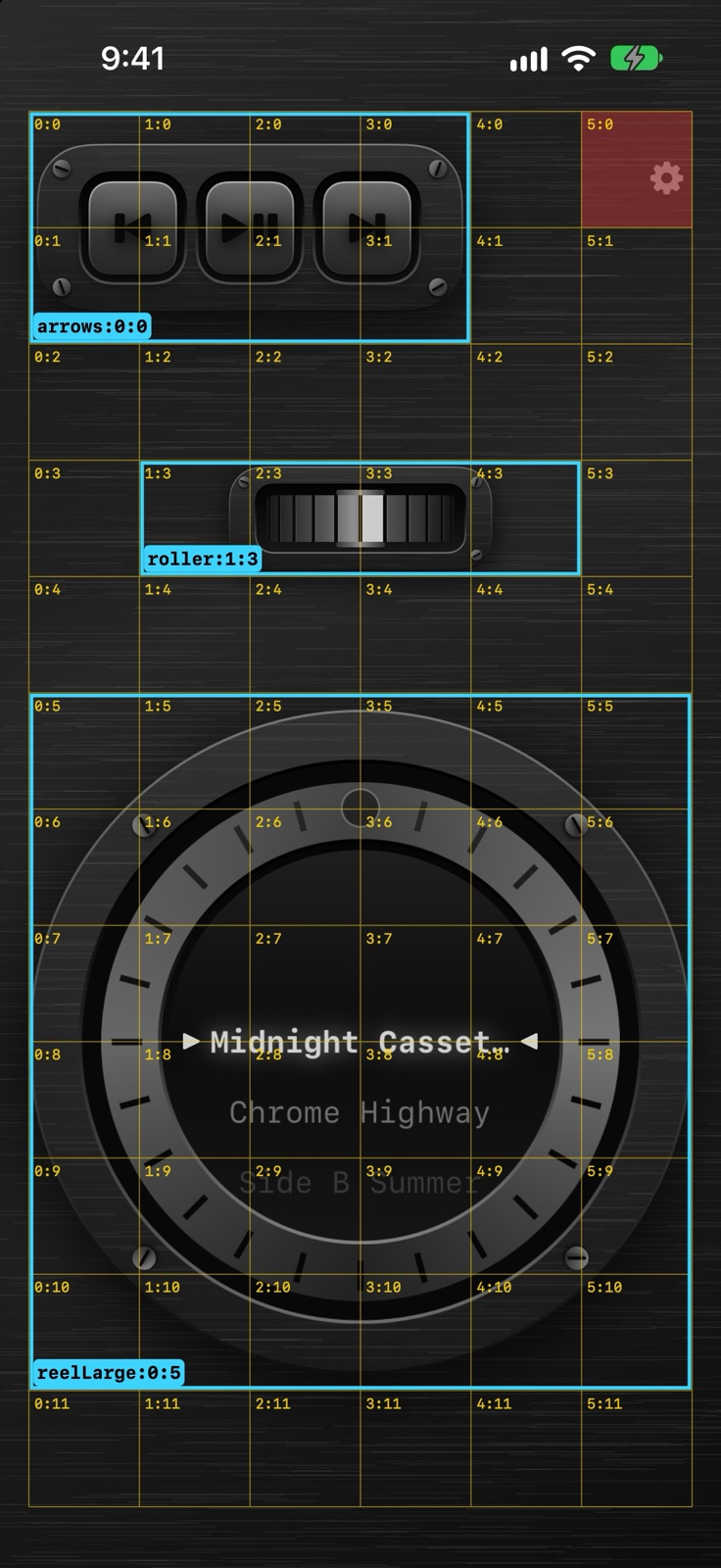
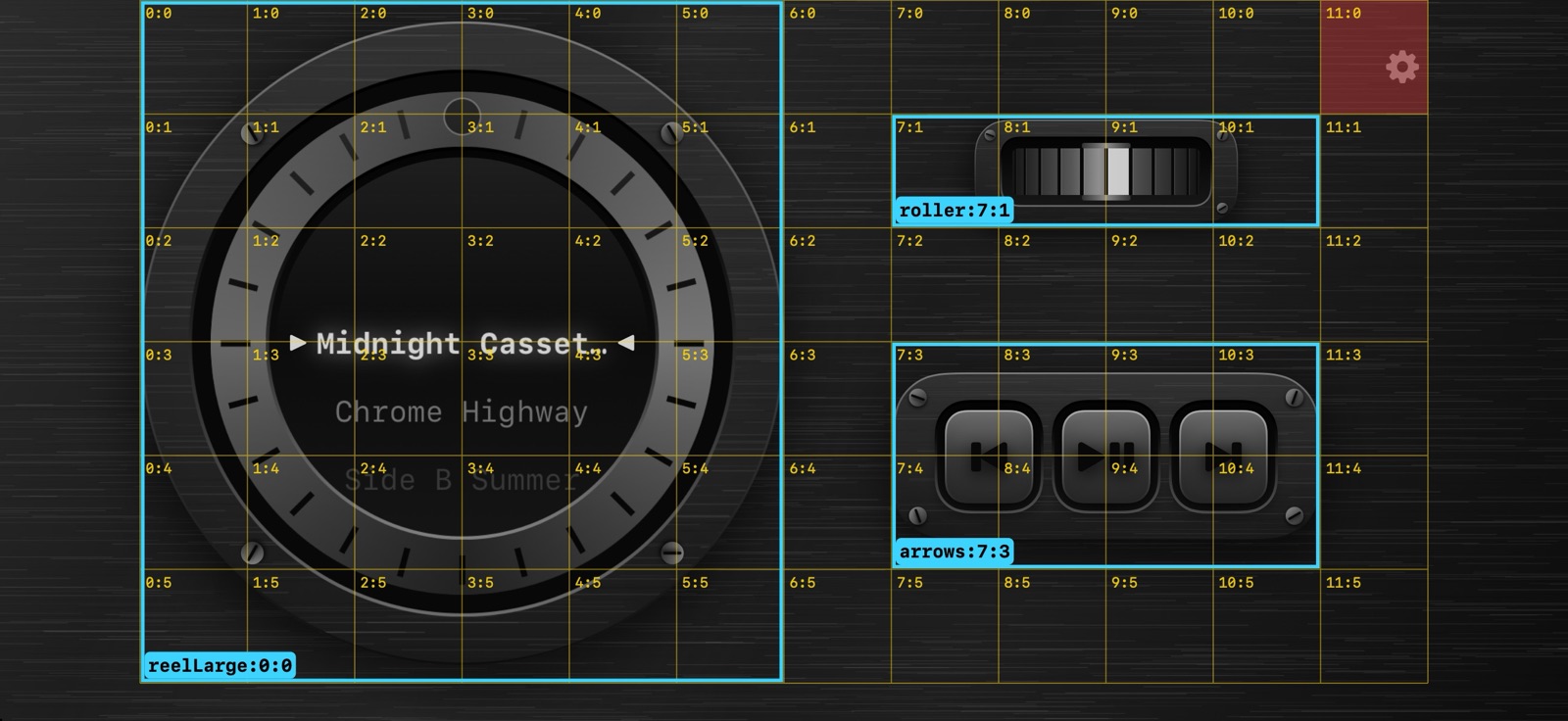
- Arrow Buttons
arrows: left plays the previous track, center plays or pauses, right plays the next track. - Horizontal Roller
roller: volume. - Large Reel
reelLarge: spin to choose a song from the list in its center.
{
  "version": 1,
  "name": "Boombox",
  "layout": ["arrows:0:0", "roller:1:3", "reelLarge:0:5"],
  "layoutLandscape": ["reelLarge:0:0", "roller:7:1", "arrows:7:3"],
  "bindings": [
    { "actions": ["arrowCenter"], "builtIn": "togglePlayback" },
    { "actions": ["arrowRight"], "builtIn": "nextTrack" },
    { "actions": ["arrowLeft"], "builtIn": "previousTrack" }
  ],
  "analog": [
    { "control": "reel", "target": "trackList" },
    { "control": "roller", "target": "volume" }
  ]
}
Focus Timer
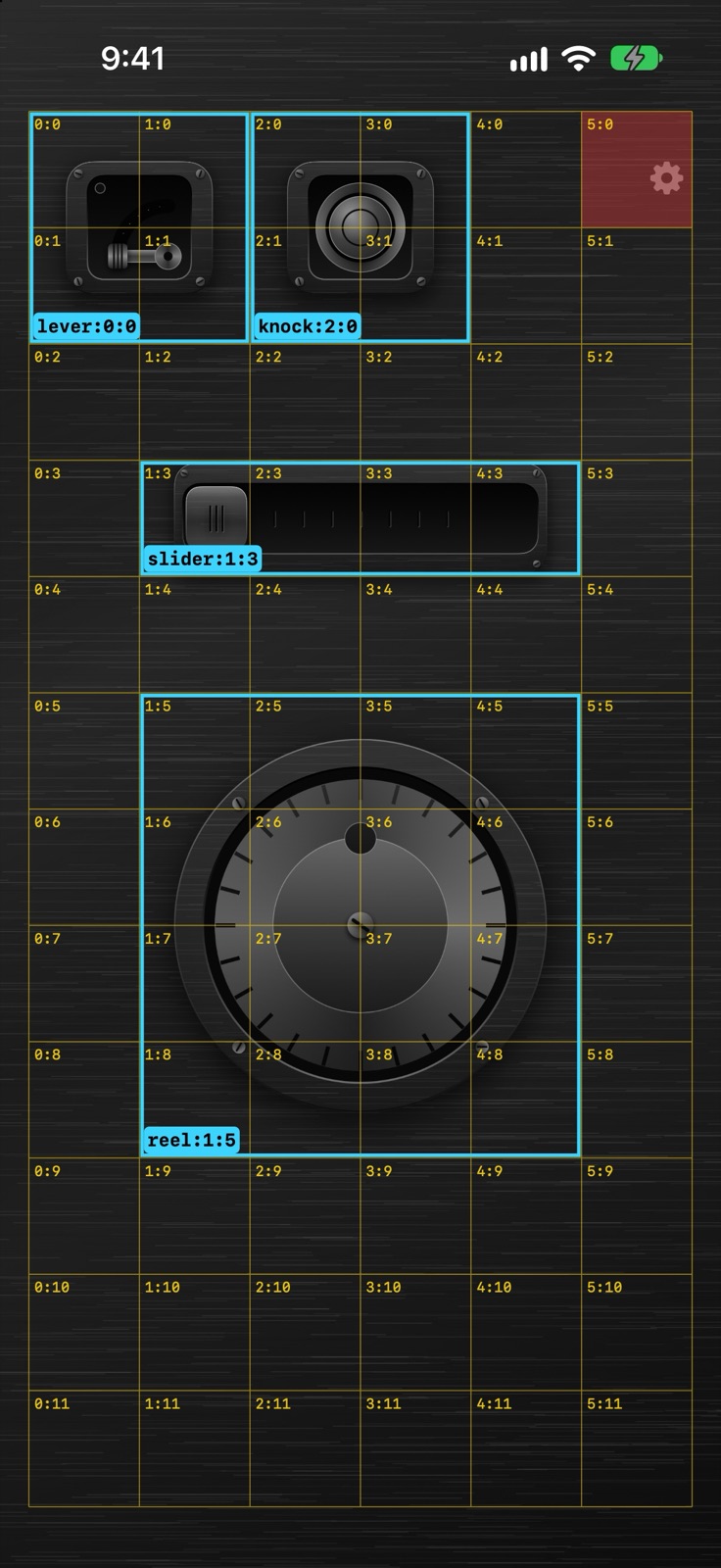
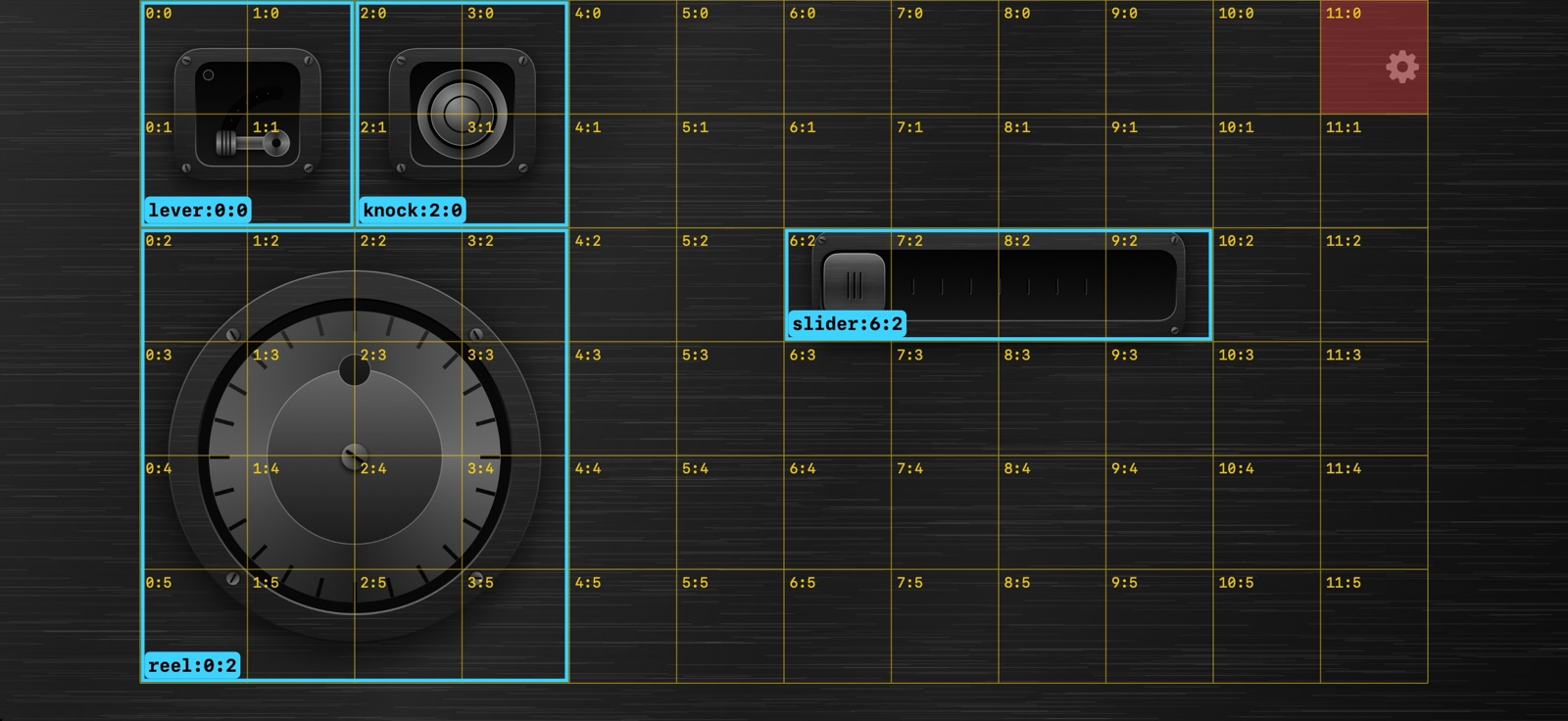
- Slider right, then spin the Reel: 25-minute timer.
- Slider left, then spin the Reel: 5-minute timer.
- Press the Click Button in: cancel the timer.
- Flip the lever up: keep the screen on, or stop keeping it on.
{
  "version": 1,
  "name": "Focus Timer",
  "layout": ["lever:0:0", "knock:2:0", "slider:1:3", "reel:1:5"],
  "layoutLandscape": ["lever:0:0", "knock:2:0", "reel:0:2", "slider:6:2"],
  "bindings": [
    { "actions": ["sliderRight", "reelSpin"], "builtIn": "timer25" },
    { "actions": ["sliderLeft", "reelSpin"], "builtIn": "timer5" },
    { "actions": ["knockIn"], "builtIn": "cancelTimer" },
    { "actions": ["leverUp"], "builtIn": "toggleKeepAwake" }
  ]
}
Flashlight Panel
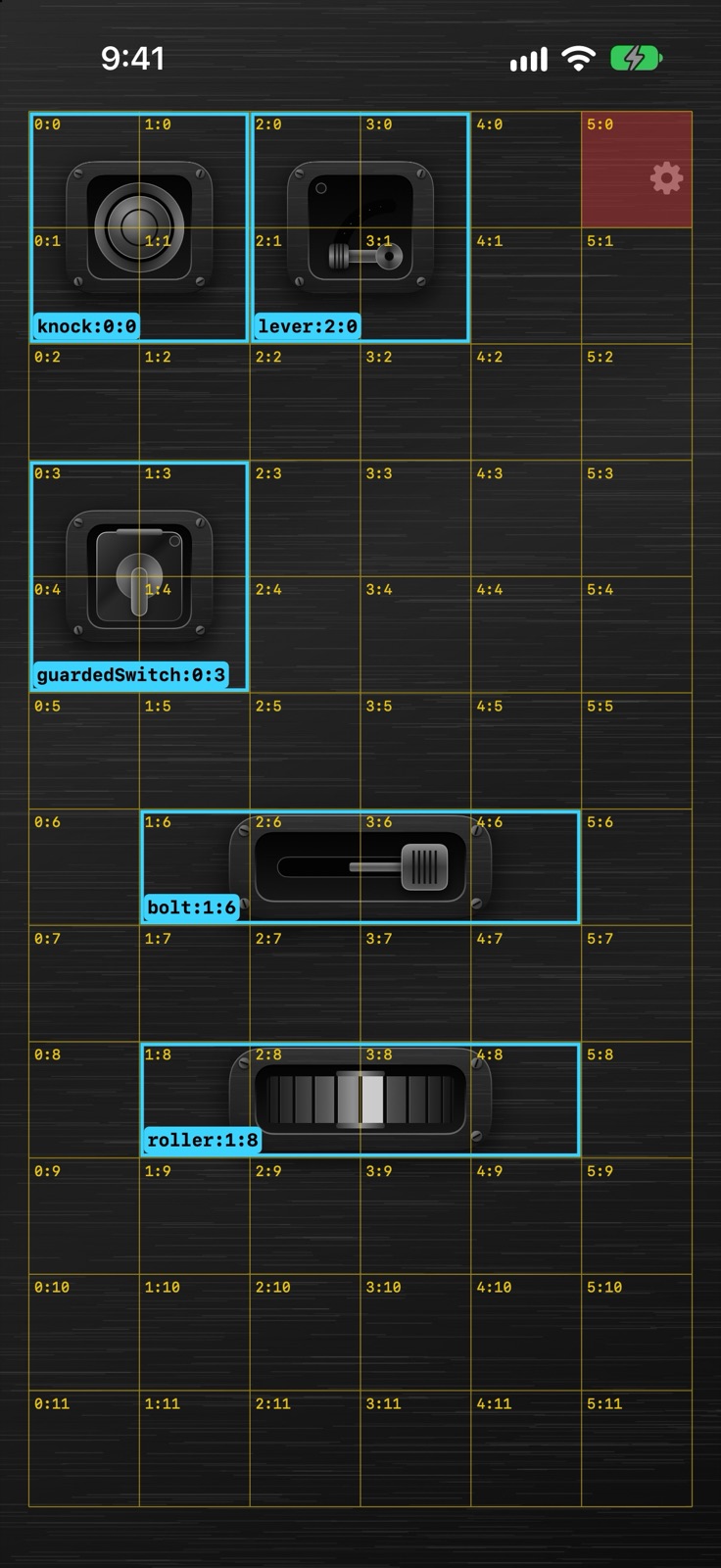
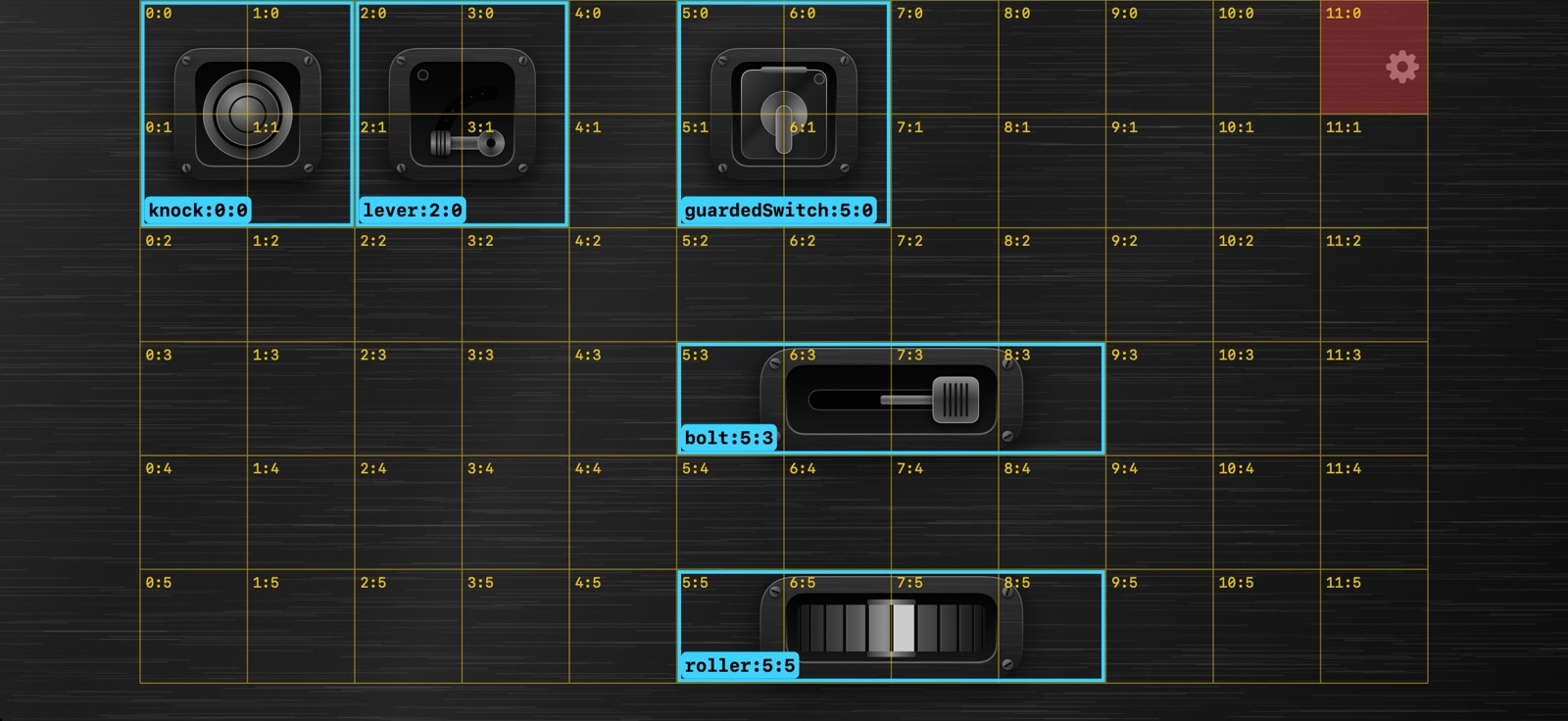
- Click Button, in or out: turn the flashlight on or off.
- Flip the lever up: blink the flashlight.
- Guarded Switch on: flash SOS.
- Pull and release the bolt: light the screen white, or turn it back.
- Horizontal Roller: flashlight brightness.
{
  "version": 1,
  "name": "Flashlight Panel",
  "layout": ["knock:0:0", "lever:2:0", "guardedSwitch:0:3", "bolt:1:6", "roller:1:8"],
  "layoutLandscape": ["knock:0:0", "lever:2:0", "guardedSwitch:5:0", "bolt:5:3", "roller:5:5"],
  "bindings": [
    { "actions": ["knockIn"], "builtIn": "toggleLight" },
    { "actions": ["knockOut"], "builtIn": "toggleLight" },
    { "actions": ["leverUp"], "builtIn": "blinkLight" },
    { "actions": ["switchOn"], "builtIn": "sosLight" },
    { "actions": ["boltCycle"], "builtIn": "toggleWhiteScreen" }
  ],
  "analog": [
    { "control": "roller", "target": "lightLevel" }
  ]
}
The downloadable files are formatted differently but have the same contents.
Contact
日本語
設定ファイルは、画面の配置と動作を1つにまとめたJSONファイルです。横画面の配置も入れられます。読み込むと、配置は置き換わり、動作はマイセットに追加されます。マイセットに同じ操作の動作があるときは、ファイルの内容に置き換わります。横画面の配置がないファイルを読み込んでも、横画面の配置は変わりません。配置か動作のどちらかが欠けたファイルでは、何も変更されません。読み込みと書き出しにはフル版が必要です。
上のサンプルをダウンロードして「ファイル」アプリに保存し、アプリの設定の「設定ファイルを読み込む」から読み込んでください。「設定ファイルを書き出す」を選ぶと、縦横の配置とマイセットが1つのファイルに保存されます。
自分で作る
文字コードUTF-8、拡張子 .json のテキストファイルです。テキストエディタで書くか、このページをAIに読ませて、作りたい画面を伝えてください。項目の名前とアイテムの一覧は、上の英語の説明と同じです(各項目に日本語名を付けています)。大文字と小文字は区別されます。ファイルは1MBまでです。
version(必須):1にします。name(必須):ファイルの名前です。1〜100文字です。layout(必須):縦画面の配置です。1つ以上書きます。layoutLandscape(省略可):横画面の配置です。省略すると、今の横画面の配置が残ります。書くときは空にできません。bindings(必須):動作です。1〜100件です。analog(省略可):動かしている間、音量などを直接変えるアイテムです。
配置の書き方
"アイテム:列:行"と書きます。指定するのはアイテムの左上のマスで、左上が0:0です。- 縦画面は横6列×縦12行(列0〜5、行0〜11)、横画面は横12列×縦6行(列0〜11、行0〜5)です。
- 右上のマスには設定ボタンがあるので使えません。縦画面は5:0、横画面は11:0です。
- マスからはみ出したり、ほかのアイテムと重なったりする場所には置けません。
- 多くのアイテムは2個まで置けます。2個目は名前の最後に2を付けます(
knock2など)。1個目も置いてください。 - 大きいサイズ(
sliderLargeなど)は、同じアイテムの通常サイズと一緒には置けず、2個目もありません。 - 決まりに合わない項目が1つでもあると、ファイルは読み込まれません。
動作の書き方
actions(必須):動かす順番です。1〜3個です。4秒以内に全部行うと、builtInの動作が実行されます。builtIn(必須):実行する動作です。text:文章やアドレスが必要な5つの動作(speakText、showText、copyText、pickFromList、openURL)にだけ、必ず書きます。1〜500文字です。pickFromListの項目は、読点(、)、カンマ、改行で区切ります。- 2の付かない操作は、1個目と2個目のどちらでも実行されます。2の付いた操作(
knockIn2など)は、2個目だけで実行されます。 reelSpinはどちら向きに回しても実行されます。向きを決めるときはreelClockwiseかreelCounterclockwiseを使います。- 実行できる動作が2つあるときは、操作の多いほうが実行されます。同じ操作の動作が2つあるときは、後に書いたほうが使われます。
- 使うアイテムが画面にないと、その動作は実行できません。おもりは、画面にあるときだけ振って動かせます。
- 操作のロックは、ノック式ボタンが画面にあり、
unlockControlsを割り当てているときだけかかります。ロック中はunlockControlsだけが実行されます。
アナログ操作の書き方
control:slider、roller、verticalRoller、reel、reel2のどれかです。target:volume(音量)、brightness(画面の明るさ)、lightLevel(ライトの明るさ)、trackPosition(曲の位置)、trackList(曲の選択)のどれかです。- 1つのアイテムが変えられるのは1つだけです。同じアイテムを2回書くと、後のほうが使われます。
reelは1個目のリールか大きいリール、reel2は2個目のリールです。slider、roller、verticalRollerは、2個目と大きいサイズにも使われます。trackListを割り当てると、曲名表示か大きいリールの中央に曲のリストが出ます。
読み込めないときは
- 「ファイルが大きすぎます。」:1MB以下にしてください。
- 「ファイルの形式を読み取れませんでした。」:カンマやかっこの抜け、
versionやnameの抜け、操作名や動作名の間違いを確かめてください。 - 「このバージョンのファイルには対応していません。」:
versionを1にしてください。 - 「配置と動作の両方が入っているファイルだけ扱えます。」:
layoutと、1件以上のbindingsを書いてください。空のlayoutLandscapeでもこの表示になります。 - 配置についての表示:名前の間違い、マスからのはみ出し、重なり、設定ボタンのマス、同じアイテムの重複、大小両方の配置がないか確かめてください。
AIに頼むときの例:「Analog Clickの設定ファイルを作って。縦と横の両方。レバーで10分タイマー、ノック式ボタンでロックと解除、ローラーで音量。」できたら、縦と横の両方でアイテムがマスに収まっているか確かめてから読み込んでください。